
By: Jacob Beasley, Director at Centroid and Kyle Berndt, Principal Consultant at Centroid — July 31, 2026
With the power of machine learning, AI technologies can be used to replace work that is tedious or difficult to do manually by humans. A variety of machine learning tools exist to automate and perform tasks ranging from transcribing audio to predicting sales forecasts. These tools can be used in isolation or combined to perform more complex and interesting tasks.
Oracle Cloud has numerous tools for implementing and utilizing machine learning, including a plethora of pre-built AI tools available via their AI Services, along with AI tools in their autonomous database. In this article, we’ll highlight several of these tools, and explore how they can be leveraged to create value and help businesses drive growth and innovation.
Machine Learning Use Cases
Machine Learning can be used to replace tedious work that would previously be done by humans as well as make sophisticated decisions using artificial intelligence.
Pre-Built Machine Learning Tools in Oracle Cloud
Oracle Cloud includes many pre-built Machine Learning Tools that are easy to integrate with. These tools all include pre-trained models that you can use, while still offering the ability for users to train and use their own custom models if they have more specialized needs.
Oracle Vision
Oracle Cloud’s Vision service is useful for image recognition tasks. It features object detection, text extraction, face detection, video analysis, and image classification. It includes pretrained models that suit many use cases, while also allowing users to create custom models to suit their specific needs.
Image Classification
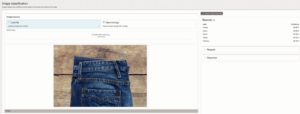
Oracle Vision’s Image Classification service is able to classify images based on their contents. In the example below, this image of a pair of jeans was classified as having “Pockets”, “Jeans”, and several other items.
One common use case for image classification is for tagging objects. An online clothing store could use these classifications to tag their products. Then customers could search by those tags. For example, a customer could search for pants with pockets.
Object Detection
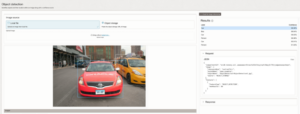
Oracle Vision’s Object Detection detects what objects exist in an image, along with providing their location, and a score of how confident the object is identified correctly. The image below shows Oracle Vision detecting 3 cars, a bus, and 2 people.
A use case for this would be managing stocks of products. Object detection could be used with a feed of a store and be used to trigger alerts when a particular item is running low on inventory.
Face Detection
It will come as no surprise that Visions’ Face Detection service is useful for detecting faces in an image. It is able to provide the location for the face, along with the locations of a few specific points, like where eyes and noses are.

Text Detection
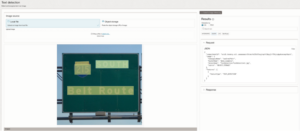
Oracle Vision’s Text Detection will detect & recognize the text in its image, and will output the text found, along with their location in the image. In the example below, it has detected the words “INTERSTATE”, “SOUTH”, “215”, and “Belt Route”.
One great use for this is for expense reporting. Rather than transcribing a receipt, a user could upload a scan or image of the receipt and have Text detection handle the tedious transcription.
Video Analysis
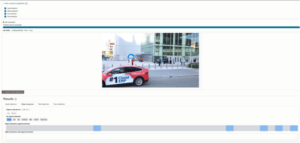
Video Analysis allows you to use the other Vision services on a video. It will process the entire video, and give you results both as an overall for the video, and for individual timestamps. In this example, you can see the Object Detection results for both this frame, and the entire video.
Document Understanding
Oracle’s Document Understanding services focus on processing and analyzing documents. Oracle provides pretrained AI models to cover most use cases, while allowing custom models to be used for cases where a model tailored to industry needs is required. They offer Text Extraction, Table Extraction, Key Value Extraction, Document Classification, and Document Elements.
Text Extraction
Text extraction is used to identify and locate words in a document. One use case for this is to take scanned documents and use text extraction to make it into a searchable PDF. That will allow users to search and copy-paste from the document, saving valuable time with regard to transcribing and finding data in those documents.

Table Extraction
Table extraction works similarly to text extraction. The main difference is that it will also provide information about tabular data. This makes it useful in cases where the tabular format of the data is important to keep, or if the document contains a tabular data that you’d like to pull into a spreadsheet.

Oracle Speech
Oracle Speech provides services for transcribing audio into text, and for converting text to speech.
Transcription Jobs
Transcription Jobs can be used to transcribe media into speech. After uploading a media file, a transcription job can be used to convert the speech in the media file into a transcription, with support for settings such as masking profanity or identifying unique speakers.
This can be used for tasks such as creating transcription of an important call or creating subtitles for a training video.
Live Transcribe
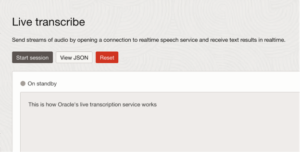
Oracle’s Live transcribe service can take a live audio feed and provide a transcription for it in real time. This could be used to add subtitles to a livestream.
Text To Speech
Oracle’s text to speech service can take text and convert it to audio. This service can be used in conjunction with AI Agents and create an automated customer support phone line.
Generative AI and Generative AI Agents
Generative AI and Generative AI Agents are tools that can be used to generate text. Oracle’s Generative AI service provides a suite of state-of-the-art LLMs that can be used for a variety of purposes. Generative AI agents can be used to link Generate AI to an assortment of tools, allowing it to do things such as accessing extra information, or performing tasks. These tools shine when they are combined with each other and the other tools.
Generative AI
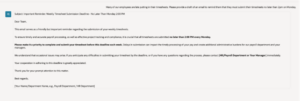
Oracle’s Generative AI service allows a user to input a prompt and have the generative AI generate a response to it. This can be used for a variety of purposes, such as generating a personalized email or helping a developer write a SQL query.
Generative AI Agents
Generative AI Agents allow generative AI to use tools to perform tasks. For example, they can do retrieval augmented generation (RAG), which allows the generative AI to access a knowledge base of documents or access a database, allowing the AI to retrieve information to provide more relevant answers. Custom tools can be added to allow AI to access or action any system you want.
In this example below, this agent has been given access to a knowledge base containing the manual for a printer. When the AI is prompted, it can access that manual to provide accurate answers to questions about the printer.

Autonomous AI Database
Oracle offers managed, autonomous AI databases that include many built-in tools to make integrating your data with AI services easy, allowing users to reap the benefits of machine learning directly within the database.
Select AI
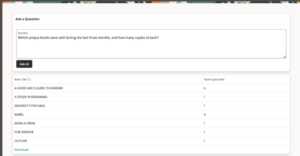
Select AI allows users to ask a question in natural language. The database will integrate with generative AI and will be able to query your database without the user needing to write the query themselves.
In this example, we are using Select AI to allow administrators of an online bookstore application to run custom reports on the database. This application was written using Oracle Apex, a low-code platform that is built into Oracle database.
Oracle Machine Learning UI
Oracle Machine Learning (OML) UI allows developers to work in a managed environment within their database. The solution makes it easy for developers to perform machine learning tasks on data directly within the database.
It includes notebooks, which are Jupyter notebooks that come with pre-configured environments making it easy to connect to your data, and use python, SQL or R to perform machine learning tasks.
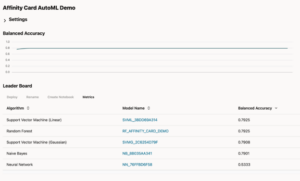
It also has AutoML Experiments, which automates the tedious process of building and testing multiple machine learning models. Developers just have to set up the experiment and let the AutoML experiment run, and come back to see the results of how different models perform for their use case.
Combining tools for more complex use cases.
Each of the tools described above is useful independently. However, many of these solutions shine when used in combination with other tools. For this very simple example, we can use document understanding text extraction to extract the contents of a document and then feed that into Generative AI to be summarized.


The use cases don’t have to be this simple. For example, you could use a machine learning model to predict customers that would be interested in a new product. You could then use a Generative AI Agent to create a personalized message for them based on their historical information and use text to speech to read the message to them over the phone.
Putting AI into Action with Oracle Cloud
Start building with Oracle Cloud’s AI and machine learning tools today. Identify a real business challenge, apply the right combination of services, and turn insights into action. From prediction to personalization to automation, the capabilities are already at your fingertips. Take the first step now and transform what your data can do for you.
Ready to unlock the full potential of AI in your Oracle environment? Whether you’re exploring your first use case or building enterprise-scale AI solutions, Centroid can help you identify opportunities, implement the right technologies, and deliver measurable business value. Contact our team to start the conversation.